Networks and ports
Traffic crosses a sandbox in two directions, set separately:
- Network is the way out: connections the guest opens, such as
apk addor an API call. - Ports are the way in: connections to a service listening in the guest, such as a web server or a database.
Both are set when the sandbox is created.
Network
network is on by default.
The guest reaches public addresses, but not this host’s loopback or private addresses.
Pass network=False to create_sandbox to block its outbound connections and name lookups, for code that should not talk to anything.
sandbox = await client.create_sandbox("alpine:latest", network=False)const sandbox = await client.createSandbox('alpine:latest', { network: false })let sandbox = client .create_sandbox(&SandboxCreateArgs::new("alpine:latest").network(false)) .await?;Ports
A port carries plain TCP, so you can reach any service that listens on one: a web server, SSH, a VNC desktop, a database, or your own protocol. virtx passes the bytes through without looking at them.
To reach a sandbox’s port, use a PortForwarder.
It forwards the port to an address on your machine, and you connect to that address.
- Pass
portstocreate_sandboxto open those ports in the sandbox. - Each one comes back in
sandbox.portswith aurl. PortForwarder.opentakes that port, or itsurl, and gives you a local address, such as127.0.0.1:54123, that any TCP client can connect to.
How the forwarding works depends on where the server runs:
- A server on your machine, started with
Client.spawn, already listens on a local address for each port, so the forwarder just gives you that address. - A server over HTTP is reached through a WebSocket.
The forwarder listens on a local port, and opens a WebSocket to the port’s
urlfor each connection made to it. The server passes the bytes between that WebSocket and the port in the sandbox.
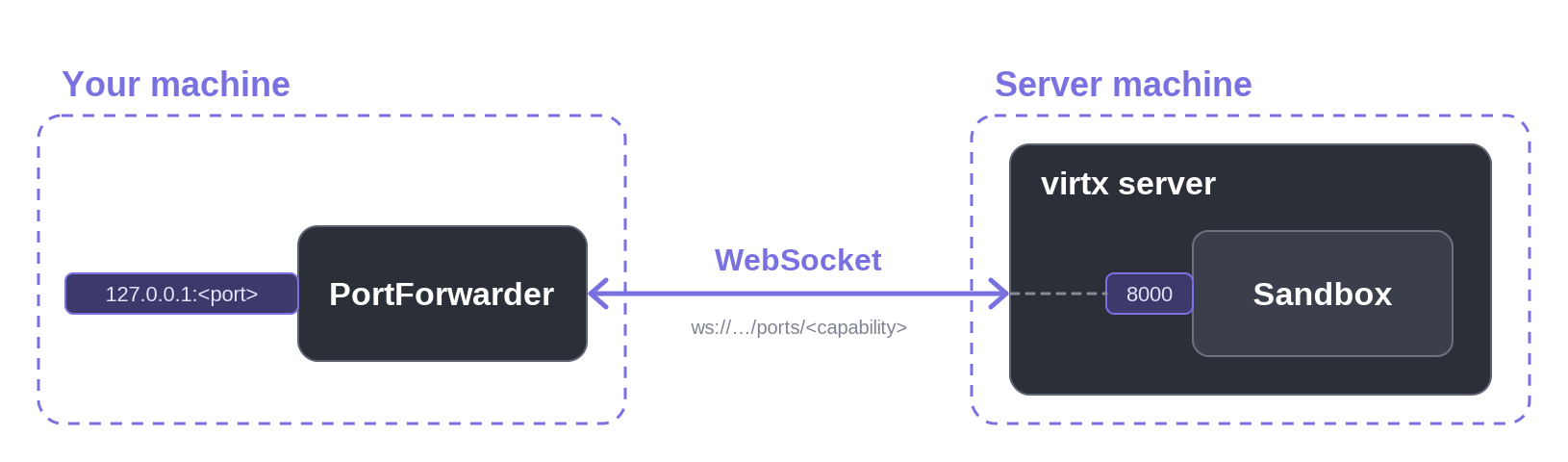
Because everything goes through the server’s own HTTP address, the server’s machine needs no other port open.
The url holds the credentials for its port, so keep it secret.
It is answered once, by create_sandbox: a sandbox found again with get_sandbox, list_sandbox or find_sandbox has each port without its url, so a program that reaches a port later keeps the port create_sandbox answered itself.
In the example below, the sandbox opens port 8000 and runs an HTTP server on it, and the forwarder makes it reachable at a local address that a browser or curl can open:
from virtx import PortForwarder
sandbox = await client.create_sandbox("alpine:latest", ports=[8000])await sandbox.exec(["httpd", "-f", "-p", "8000"])  # started, left running
with PortForwarder.open(client, sandbox.ports[0]) as forwarder:    print(f"http://{forwarder.address}")
const { PortForwarder } = require('@brekkylab/virtx')
const sandbox = await client.createSandbox('alpine:latest', { ports: [8000] })await sandbox.exec(['httpd', '-f', '-p', '8000']) // started, left running
const forwarder = PortForwarder.open(client, sandbox.ports[0])console.log(`http://${forwarder.address}`)forwarder.close()let sandbox = client .create_sandbox(&SandboxCreateArgs::new("alpine:latest").port(8000)) .await?;sandbox.exec(&SandboxExecArgs::new(["httpd", "-f", "-p", "8000"])).await?; // started, left running
let forwarder = PortForwarder::open(&client, &sandbox.info().ports[0])?; // the port as it was made, with its urlprintln!("http://{}", forwarder.address());drop(forwarder);Each entry of sandbox.ports names the guest’s port beside its url, in the order they were asked for.
A port given twice, or port 0, is refused.
The url is given only when the sandbox is created, since it carries the port’s credentials: forward the port create_sandbox answered, and keep it if you will reach the port later.
A sandbox got again with get_sandbox, find_sandbox or list_sandbox, from this program or another, still has its ports, each with its port, label, protocol and any address, but no url, and a forwarder refuses to open such a port.
A connection made while nothing listens on the port in the guest is closed at once, as a closed port’s would be: start the service before connecting.
Through a server over HTTP, the forwarder says what it saw: a connection whose WebSocket is refused, or closed before the port sent a byte, with the reason the server gave if it gave one, is kept as the forwarder’s last error, and logged as a warning that names the port and what the server answered – never its url.
A port that took the connection and closed it without a word ends the same way, so the message says what happened to the connection, not what runs in the sandbox.
Read it after a connection dies with forwarder.last_error in Python, forwarder.lastError in Node.js and forwarder.last_error() in Rust: an error whose message names the port, with the status the server refused the WebSocket with, if it did.
It is the last failure, not whether the port is reached now: it is none until a connection fails, and none again once a later connection’s port sends a byte, so a program that retries while its service starts reads none once one gets through.
The warning goes to the virtx logger in Python, as a VirtxWarning through process.emitWarning in Node.js, and to the log crate under the target virtx in Rust.
Ports are opened only when the sandbox is created, and stay open until it is removed. Closing a forwarder stops forwarding on this machine; the port in the sandbox stays open, and another forwarder can reach it again.
A server on this machine answers each port with a loopback address already, which a TCP client can also reach as it is.
A server over HTTP answers a URL that only a PortForwarder opens, so use one either way.
What a port is for
A port in ports is a number for plain TCP, or a spec that says more: a label of up to 128 characters saying what it is for, and a protocol, tcp or http.
Each comes back in sandbox.ports with its label and protocol as given.
An http port is HTTP served in the sandbox, reached at its url by a browser as by any client, WebSockets included, with no forwarder.
A server on this machine answers it a loopback address that a browser opens as it is.
A server that cannot serve a port over HTTP refuses http with 400, invalid: virtx-server-tcp’s URLs are a forwarder’s alone, so it does.
from virtx import PortSpec
sandbox = await client.create_sandbox(    "node:22",    ports=[PortSpec(5173, label="dev server", protocol="http")],)print(sandbox.ports[0].url)  # open it in a browser
const sandbox = await client.createSandbox('node:22', { ports: [{ port: 5173, label: 'dev server', protocol: 'http' }],})console.log(sandbox.ports[0].url) // open it in a browserlet web = PortSpec::new(5173) .label("dev server") .protocol(PortProtocol::Http);let sandbox = client .create_sandbox(&SandboxCreateArgs::new("node:22").port(web)) .await?;println!("{}", sandbox.info().ports[0].url.as_deref().unwrap()); // open it in a browserA server reachable from other machines may also answer a tcp port with an address, host:port, where any TCP client reaches it directly, with no forwarder.
Unlike the url, it is not secret: what listens on the port answers whoever connects, and has to authenticate them itself.
Who a port lets in
A server may keep inbound rules for a port, as a security group does: the addresses it lets in.
Each rule is a source, an IPv4 or IPv6 CIDR such as 203.0.113.0/24 or one address such as 203.0.113.7, and an optional description.
Give them as the sandbox is made, with inbound in the port’s spec; an empty list lets in no one.
from virtx import InboundRule, PortSpec
sandbox = await client.create_sandbox(    "alpine:latest",    ports=[PortSpec(22, inbound=[InboundRule("203.0.113.7", "office")])],)
const sandbox = await client.createSandbox('alpine:latest', { ports: [{ port: 22, inbound: [{ source: '203.0.113.7', description: 'office' }] }],})let ssh = PortSpec::new(22).inbound([InboundRule::new("203.0.113.7").description("office")]);let sandbox = client .create_sandbox(&SandboxCreateArgs::new("alpine:latest").port(ssh)) .await?;A server that keeps no rules refuses a port given inbound with 400, invalid, rather than open it to whoever the rules were meant to keep out: virtx-stdio and virtx-server-tcp keep none.
A server that keeps them may open a port whose rules it could not set, such as past a quota, and say why in its inbound_error (inboundError in Node.js): a code, a message, and for a quota a reason.
Such a port lets no one in, and has no address, until its rules are set.