TL;DR
- Virtual machines (VMs) virtualize hardware, allowing each workload to run with its own operating system and kernel.
- Containers isolate workloads within a shared operating system with minimal overhead.
- MicroVMs are lightweight virtual machines designed to reduce startup time and resource consumption while retaining hardware-backed isolation.
- MicroVMs are useful for short-lived workloads, serverless computing, untrusted code execution, and AI agents.
- With virtx, developers can create microVMs directly from their application code, reuse existing container images, and run workloads locally, on their own servers, or in the cloud through the same sandbox API.
If you have ever deployed an application with Docker or launched a virtual machine on a cloud provider, you have already worked with two of the most widely used technologies for running software in isolated environments.
Virtual machines and containers solve similar problems, but they approach them differently. Virtual machines provide independent computing environments, while containers share the underlying operating system to reduce resource consumption and startup time.
For many years, developers have chosen between these approaches depending on their workloads. However, as cloud computing, serverless platforms, and AI agents have introduced new execution patterns, another approach has gained attention: the microVM.
What exactly is a microVM? Why was it developed? And how can you use one in your own projects?
Let’s start with how virtual machines and containers work.
VM vs Container: What’s the Difference?
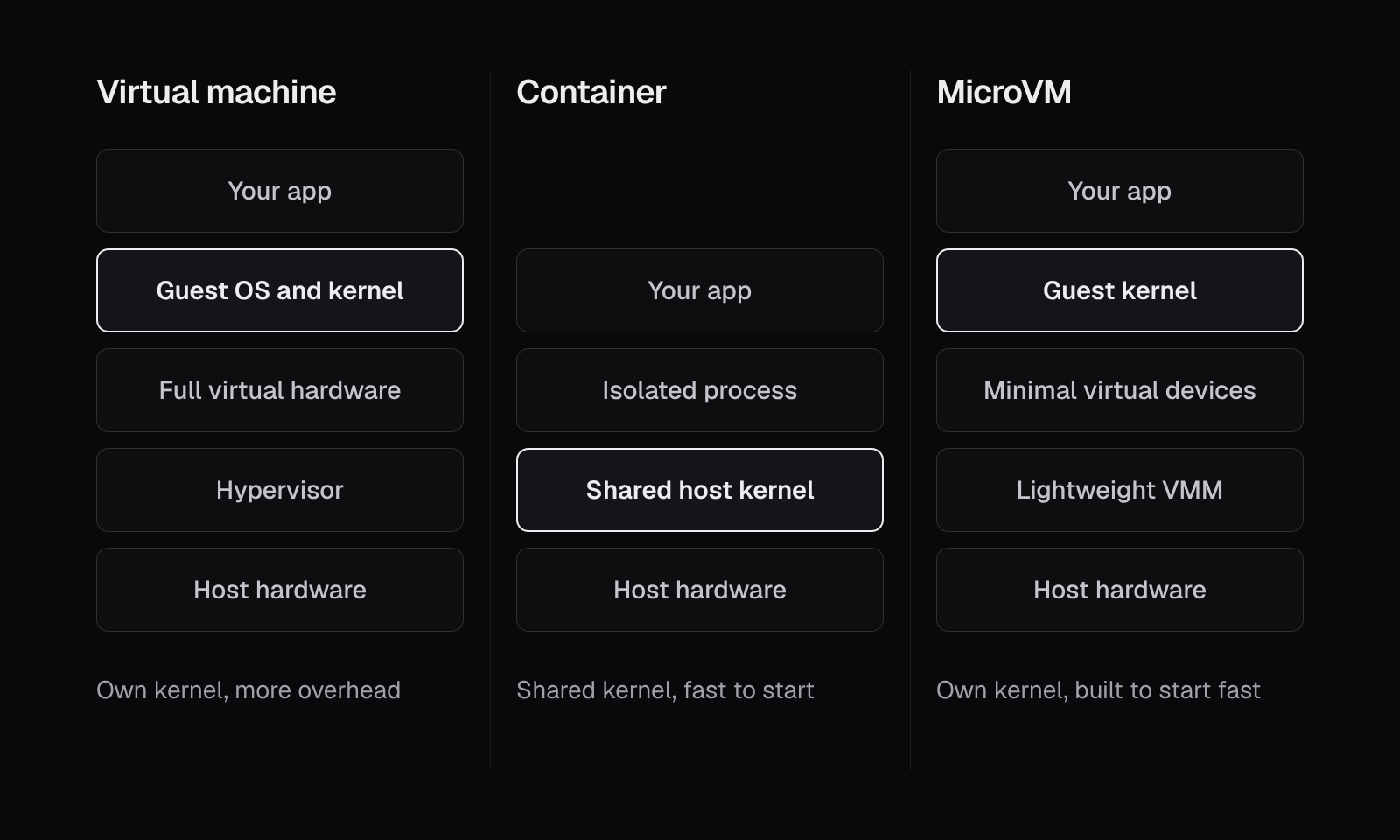
Both virtual machines and containers allow multiple workloads to run independently on the same physical machine. The main difference is the layer at which they provide isolation.
What is a virtual machine?
A virtual machine is a software-defined computer that runs on top of physical hardware.
A hypervisor provides virtual machines with virtual CPUs, memory, storage, network interfaces, and other devices.
Each VM runs its own operating system, including its own kernel. From the perspective of an application running inside the VM, it behaves much like an independent physical computer.
However, booting and maintaining a separate operating system introduces additional resource overhead.
What is a container?
A container takes a different approach. Instead of virtualizing an entire computer, it isolates processes within an existing operating system.
Containers do not need to boot their own kernels. They share the kernel of the operating system on which they run.
This makes containers attractive for application packaging and deployment. They are generally fast to start, require relatively little memory, and benefit from a mature ecosystem of images, registries, and orchestration tools.
Neither approach is universally better. Containers and virtual machines are designed around different trade-offs.
But what if you could retain the architecture of a virtual machine without much of the overhead associated with traditional virtualization?
This is where microVMs come in.
What Is a MicroVM?
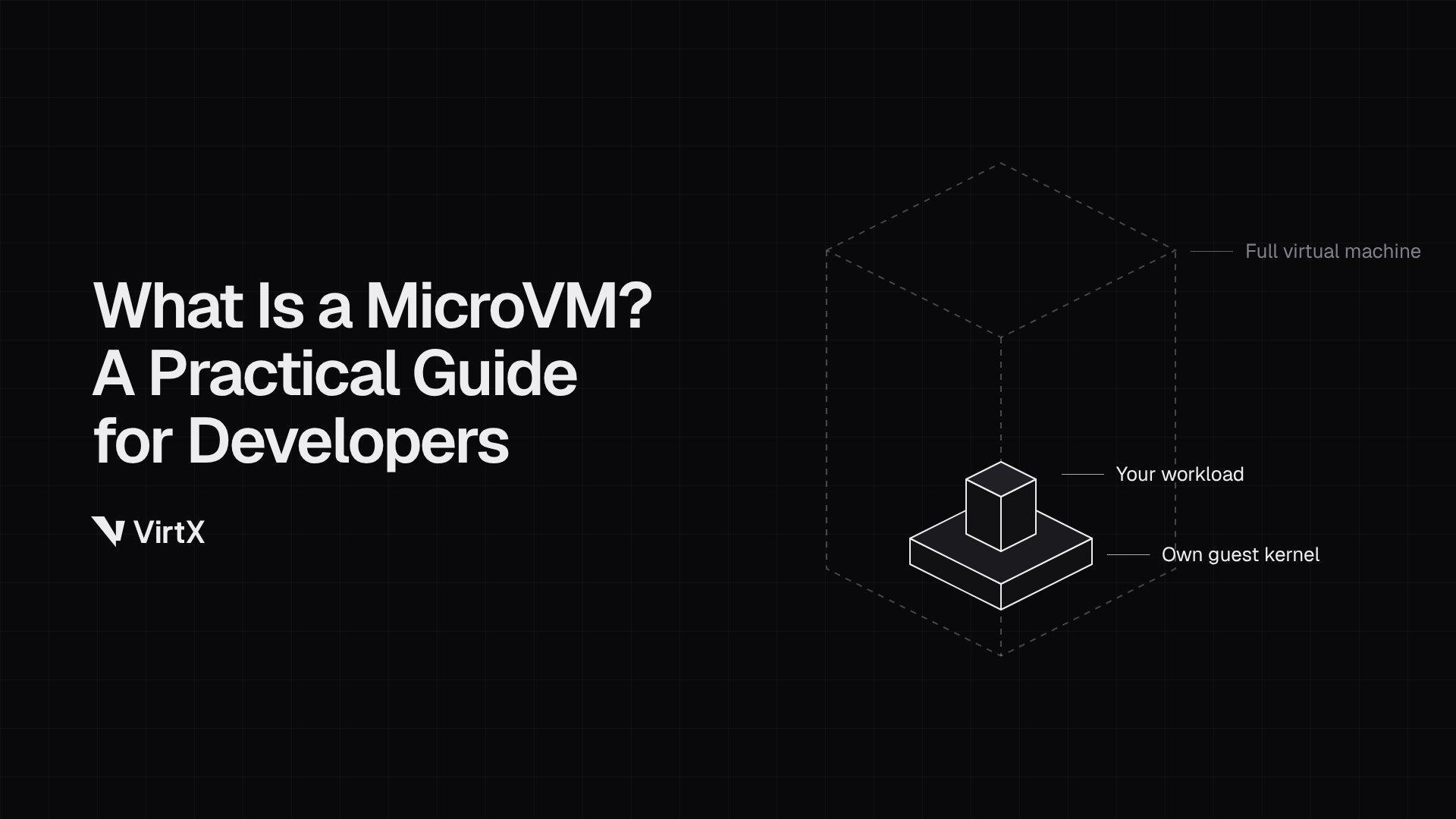
A microVM is a lightweight virtual machine designed to minimize the overhead of traditional virtualization while retaining hardware-backed isolation.
Why were microVMs developed?
Traditional virtual machines work well for long-running servers, where startup time is often less of a concern.
However, workloads such as serverless functions and CI jobs frequently require computing environments that can be created and discarded on demand. Today, AI agents are introducing similar requirements.
MicroVMs were developed to make VM-based execution practical for these kinds of short-lived workloads.
What makes microVMs different?
MicroVMs are designed around three key characteristics:
- Fast startup: Minimal virtual hardware and streamlined boot processes reduce the time required to create a virtual machine.
- Lower resource overhead: Minimal virtual device models and optimized virtual machine monitors (VMMs) can reduce per-VM resource consumption, allowing more workloads to run on the same machine.
- Independent computing environments: Each microVM retains its own guest kernel and hardware-backed isolation boundary.
There is no strict definition based on boot time or memory usage that separates a microVM from a traditional VM. The distinction is primarily one of design goals and implementation.
A microVM is a virtual machine built for fast starts and low overhead.
Technologies behind microVMs
Several open-source technologies provide the foundations for lightweight virtual machines:
- Firecracker: Developed by AWS to support services such as AWS Lambda and AWS Fargate.
- Cloud Hypervisor: A virtual machine monitor optimized for modern cloud workloads.
- libkrun: A library that allows applications to run workloads inside lightweight virtual machines.
While these technologies take different approaches, they share a common idea: a virtual machine does not need to reproduce every feature of a general-purpose computer to run useful workloads.
For a detailed comparison of isolation and security, see MicroVM vs Container.
When Should You Use a MicroVM?
MicroVMs are particularly useful when workloads need independent computing environments that can be created and removed frequently.
Here are several common use cases.
Serverless computing
Serverless platforms need to execute functions on demand, often for only a few seconds or minutes.
They must provision environments quickly, manage large numbers of workloads, and isolate functions belonging to different customers.
MicroVMs are a natural fit for these requirements, which is why technologies such as Firecracker were developed for large-scale cloud services.
Running untrusted code
Online coding platforms, data processing services, and code execution APIs often allow users to submit their own programs.
These workloads may contain unexpected behavior, resource-intensive operations, or malicious instructions.
Running each workload inside a microVM provides an independent guest kernel and a hardware-backed isolation boundary.
With the appropriate management tooling, developers can also control CPU, memory, execution time, network access, and which files are exposed to the workload.
Giving AI agents their own computers
Modern AI agents increasingly do more than generate text. They write and execute code, install software, interact with files, operate browsers, and perform tasks using external tools.
Unlike a traditional application, an agent may generate its execution logic dynamically. Developers cannot always predict exactly what code will run or which resources it will attempt to access.
Rather than treating a sandbox as a place to execute individual snippets of code, a microVM allows developers to give an AI agent an entire computer in which it can work.
For example, an AI agent could use a microVM to:
- Install Python packages and analyze a dataset.
- Generate and execute scripts.
- Build and test a software project.
- Process images and other files.
- Launch and interact with an application.
The environment can be discarded when the task is complete or retained when the workload needs to continue.
Depending on the application architecture, the agent runtime itself can also run inside the virtual machine.
Ailoy, an open-source AI agent SDK that uses virtx, is an example of this approach. It gives agents their own Linux environments where they can execute code, install software, and perform tasks beyond predefined tool calls.
Development and CI environments
Development tools and CI systems frequently need clean, reproducible environments.
MicroVMs allow each build, test, or development session to run independently, without requiring a long-lived virtual machine for every task.
This is useful when jobs modify their execution environments, install dependencies, or require a separate operating system environment.
Why Aren’t MicroVMs as Easy to Use as Containers?
MicroVMs sound useful, but how do you run one?
Developers who want to use containers can typically install Docker, pull an image from a registry, and start running applications within minutes.
Docker made containers popular by making them easy to start.
Getting started with microVMs can involve more infrastructure work.
Technologies such as Firecracker, Cloud Hypervisor, and libkrun provide the foundations for running lightweight virtual machines. Depending on the technology, developers may still need to prepare guest kernels and root filesystems, configure virtual devices, manage networking, and implement mechanisms for executing commands and transferring files.
For infrastructure engineers building their own virtualization platforms, this level of control can be valuable.
But if your goal is simply to run workloads inside microVMs, you may not want to build and maintain that infrastructure yourself.
Platform compatibility introduces another challenge. Firecracker, for example, relies on Linux KVM and cannot run natively on macOS or Windows.
E2B offers another approach by abstracting much of the infrastructure behind an API. It runs Firecracker microVMs through a managed cloud service and also offers a self-hostable stack.
However, you may want to process local files without uploading them to a remote service, experiment without creating a cloud account, or run workloads on infrastructure you already own.
Ideally, using a microVM would be as straightforward as working with a container: choose an image, start an environment, execute a command, and remove the environment when you are done.
And developers should be able to do this directly from their application code, on the machines they already use.
That’s why we built virtx.
Running MicroVMs with virtx
virtx is an open-source tool for creating and managing disposable Linux virtual machines directly from your applications.
Just as Docker made containers accessible to application developers, we’re building virtx to make microVMs accessible directly from application code.
You don’t need to manage guest kernels, configure virtual devices, or build your own virtualization infrastructure.
Run microVMs without a separate daemon
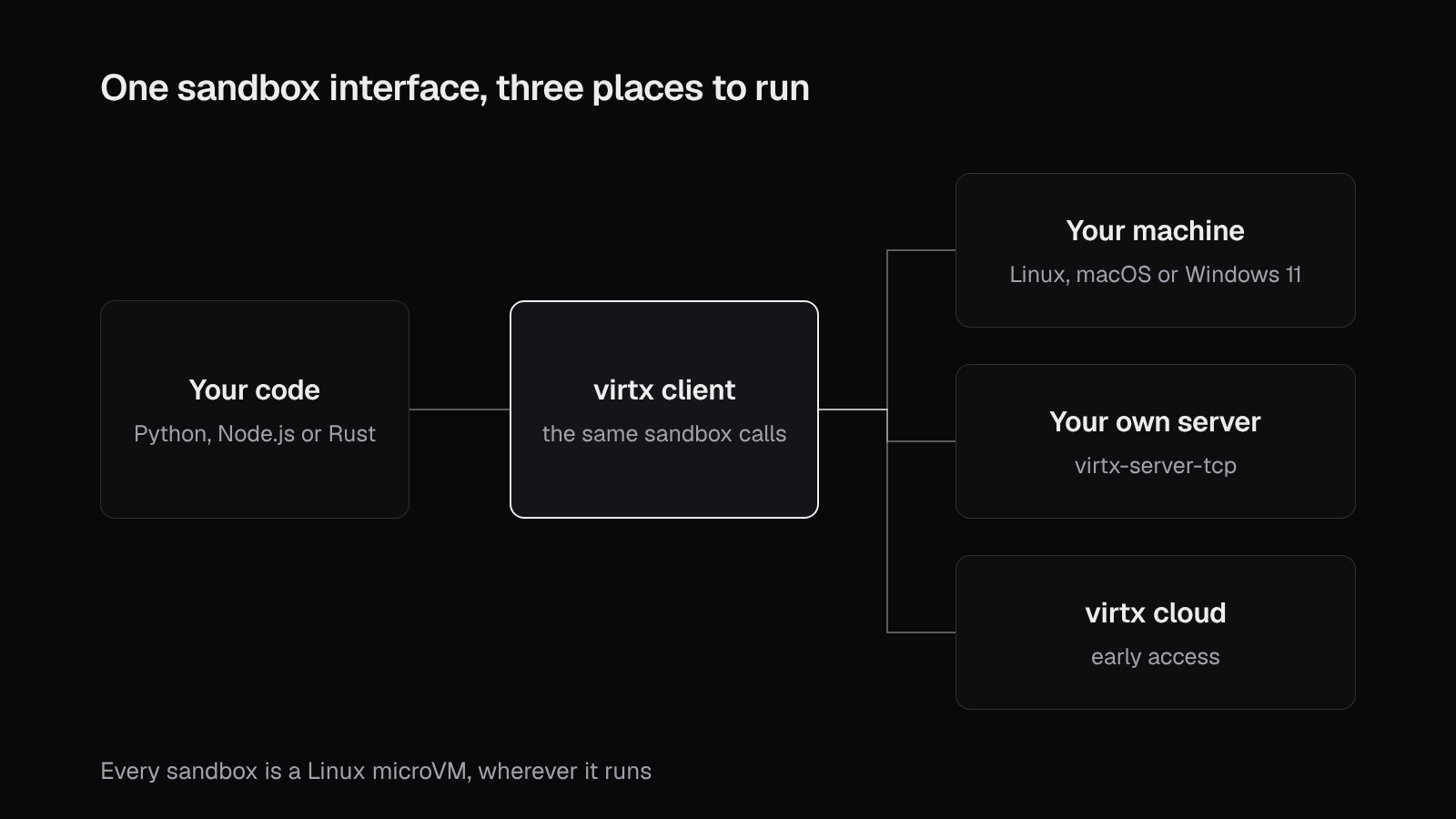
With virtx, you can create and manage microVMs programmatically using Python, Node.js, or Rust.
There is no need to start a separate background daemon, provision a dedicated Linux server, or create a cloud account to get started locally.
Your application can create a virtual machine whenever it needs one, execute commands, read and write files, install software, and remove the environment when the task is complete.
Instead of treating virtual machines as infrastructure that must be provisioned separately, you can manage them as part of your application’s logic.
Run microVMs on your own machine
virtx supports Linux, macOS, and Windows using the hardware virtualization capabilities available on each supported platform.
| Host platform | Virtualization technology |
|---|---|
| Linux (with KVM support) | KVM |
| macOS (Apple silicon) | Hypervisor.framework |
| Windows 11 (x86_64) | Windows Hypervisor Platform |
The guest environment is always Linux.
This allows developers to build and test microVM-based applications directly on their existing machines without relying on remote infrastructure.
Create a microVM from an OCI image
One of the biggest advantages of containers is their existing image ecosystem.
With virtx, you can reuse existing OCI images, including images from Docker Hub, as the starting point for virtual machines.
For example, creating a Linux microVM from a familiar Ubuntu image and executing a command inside it takes only a few lines of Python:
import asynciofrom virtx import Client
async def main():    with Client.spawn() as client:        await client.pull_image("ubuntu:24.04").complete()        sandbox = await client.create_sandbox("ubuntu:24.04")        try:            await sandbox.exec(["uname", "-s"]).complete(print=True)        finally:            await sandbox.remove()
if __name__ == "__main__":    asyncio.run(main())
Even when the application runs on macOS or Windows, the command inside the sandbox returns Linux.
Although the image comes from the same ecosystem used by Docker, the execution environment is different.
The workload runs inside a virtual machine with its own Linux kernel, rather than as an isolated process sharing the underlying operating system’s kernel.
You get the convenience of familiar container images with the execution architecture of a virtual machine.
Run locally, on your own server, or in the cloud
One of the key advantages of virtx is that the same application can work with different execution backends.
You can prototype locally, deploy to your own infrastructure, or use virtx cloud without rewriting the code that creates and interacts with your sandboxes.
This gives you the flexibility to choose where your workloads run based on your requirements, whether those involve data privacy, infrastructure ownership, or access to additional computing resources.
You do not have to commit to a particular infrastructure model before building your first microVM-based application.
The location of the execution environment changes, but the sandbox interface remains the same.
You can find complete examples, installation instructions, and platform requirements in the virtx GitHub repository.
virtx cloud is currently in early access. Apply for early access.
Conclusion
MicroVMs build on the virtual machine model and optimize it for workloads that benefit from fast provisioning, reduced overhead, and independent computing environments.
As more applications need to execute dynamic workloads, whether for serverless computing, AI agents, development environments, or user-submitted code, the ability to create independent computing environments on demand becomes increasingly useful.
But getting started with microVMs should not mean building your own virtualization infrastructure or relying on a managed cloud service from day one.
With virtx, you can create microVMs directly from your application code, reuse the container images you already know, and choose where your workloads run.
With the right tooling, a microVM becomes an everyday developer tool. Visit virtx.sh or explore the GitHub repository to get started.
FAQs
Is a microVM the same as a virtual machine?
Yes. A microVM is a type of virtual machine optimized to reduce startup time and virtualization overhead. It retains an independent guest kernel and a hardware-backed isolation boundary while typically providing a more minimal virtual hardware configuration.
Are microVMs faster than traditional VMs?
MicroVMs are generally designed to start faster and consume fewer resources than general-purpose VMs. Actual performance depends on the virtualization technology, guest operating system, configuration, and hardware.
What are microVMs used for?
Common use cases include serverless computing, untrusted code execution, AI agent environments, multi-tenant platforms, and disposable development and testing environments.
Can I create a microVM from an OCI image?
Yes, with the appropriate tooling. virtx allows developers to create microVMs from existing OCI images, including compatible images available on Docker Hub. This makes it possible to reuse familiar software environments without running the workload as a conventional container.
Can I run microVMs on my own computer?
Yes. With virtx, you can run Linux microVMs on Linux machines with KVM support, Macs with Apple silicon, and Windows 11 machines with x86_64 processors and the necessary virtualization support.
You do not need to provision a cloud server or create a cloud account to get started. Self-hosted and cloud execution are additional options when remote computing resources are needed.