TL;DR
- A microVM is a virtual machine trimmed to what one workload needs, so it keeps hardware isolation with less startup time and memory.
- Each microVM runs its own Linux kernel, and a hypervisor keeps that kernel apart from the host.
- A small program called a virtual machine monitor creates and runs the microVM, and it emulates a handful of devices.
- The cost is host support and a smaller device set: the host needs hardware virtualization turned on, and anything that expects a missing device has to look elsewhere.
- virtx starts disposable microVMs from Python, Node or Rust on KVM, Hypervisor.framework or the Windows Hypervisor Platform.
A virtual machine is a whole computer simulated in software. For years the price of that isolation was a slow start and heavy memory use, because the simulation reproduced hardware that most workloads never touch. A microVM keeps the isolation and drops most of the simulated hardware.
This post builds the idea from the ground up. You will see what a plain virtual machine contains, which parts a microVM removes, how the pieces stack from the chip to your code, what happens inside virtx when a sandbox starts, and when a microVM is the wrong tool.
What a plain virtual machine contains before any trimming
A virtual machine gives a program a computer made of software: a virtual processor, a slice of memory, a virtual disk and a virtual network card. A hypervisor, the software layer that runs virtual machines, lets several of them share one physical machine, and the processor’s own virtualization features keep each one walled off from the others.
Inside the machine runs a guest, an operating system with its own kernel. The kernel is the core of an operating system, the part that decides what programs may touch, and the guest kernel here is separate from the host’s.
A traditional virtual machine also boots the way a physical computer does, through firmware and a set of emulated hardware. That boot path and that hardware cost time and memory, and a microVM exists to cut both.
Which parts a microVM removes to boot faster
A microVM removes the firmware step and most of the emulated hardware. Three open-source projects show how far that goes:
- Firecracker excludes unnecessary devices and guest-facing functionality to reduce the memory footprint and attack surface of each microVM.
- QEMU’s microvm machine type is a minimalist machine without PCI or ACPI support, designed for short-lived guests.
- Cloud Hypervisor lists minimal emulation and a small attack surface among its goals.
In outline, a microVM start looks like this:
- A virtual machine monitor asks the host’s hypervisor interface for a new virtual machine and gives it processors and memory.
- The monitor loads a Linux kernel straight into that memory, with no firmware stage.
- The kernel starts and mounts a root filesystem built from an image.
- Your workload runs as a process inside the guest.
Fewer steps and fewer emulated devices make the whole sequence short. Firecracker’s specification targets 125 ms or less from the start call to the guest’s init, measured on a 1 CPU, 128 MiB guest with a minimal kernel and root filesystem.
The same few devices leave an attacker with less to probe. VENOM, disclosed in 2015, let code in a guest escape through QEMU’s virtual floppy disk controller, a device that almost no cloud workload uses.
How the layers stack from the processor up to your code
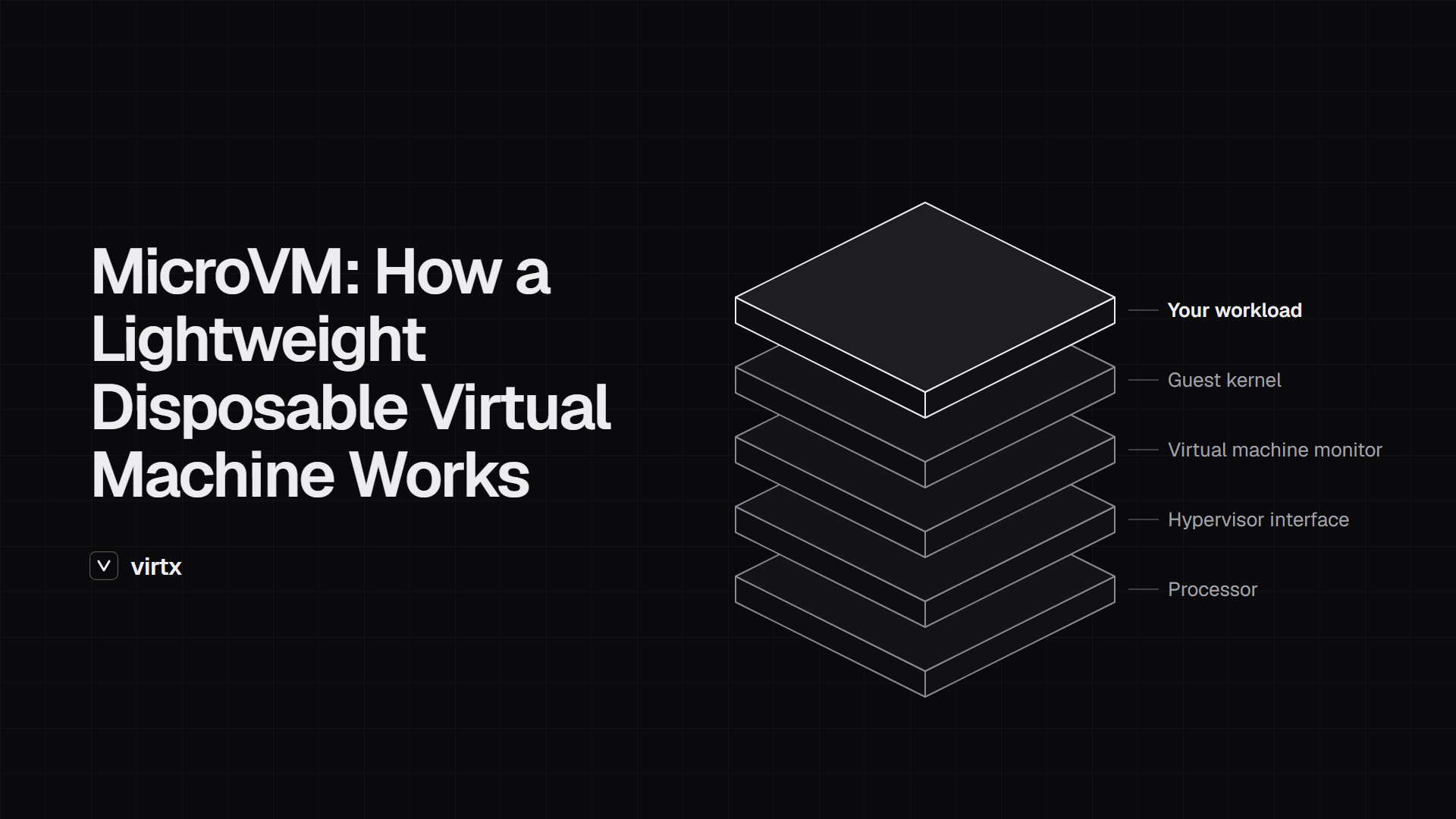
The bottom layer is the processor, which has built-in support for running virtual machines. Above it sits the hypervisor interface of the host operating system: KVM on Linux, Hypervisor.framework on macOS and the Windows Hypervisor Platform on Windows.
The virtual machine monitor sits above that. It runs as an ordinary program, asks the interface for a virtual machine and emulates the few devices the guest needs. Above the monitor comes the guest kernel, and above the kernel comes your workload.
The term “microVM” names the monitor and the guest, and the boundary underneath them is the same hardware boundary a full virtual machine uses. Counted from the top, the five layers are your workload, the guest kernel, the monitor, the hypervisor interface and the processor. The next section looks at the projects that fill the monitor layer.
How four open-source projects fill the microVM monitor layer
Several open-source projects fill the monitor layer, and each aims at a different place. The table sums up what each project is.
| Project | What it is |
|---|---|
| Firecracker | A monitor developed at AWS to speed up services like Lambda and Fargate, built on KVM |
| Cloud Hypervisor | An open-source monitor written in Rust for modern cloud workloads, running on KVM and MSHV |
| QEMU microvm | A minimalist machine type inside QEMU, designed for short-lived guests |
| libkrun | A library a program embeds to run processes in a lightweight VM, on KVM for Linux and HVF for macOS on Apple silicon |
Kata Containers sits one layer up, as a container runtime that runs each Kubernetes pod in a lightweight VM on monitors like these. virtx builds on libkrun.
The choice depends on whether you run a fleet of workloads on servers or start a VM from inside an application. Applications favor the embedded library, since there is no separate service to run.
What you give up compared with a container or a full machine
A microVM trades some convenience for its boundary. Each point below is a cost worth weighing:
- Host support: the host needs hardware virtualization available to your user, which is a setting in the machine’s firmware on Linux.
- A second kernel: a microVM boots a kernel of its own, so it starts slower and reserves more memory than a container, which has no kernel to boot.
- A smaller device set: a workload that needs a device the monitor leaves out has to look elsewhere.
A container fits trusted code, since it skips all three costs. A microVM fits code you do not control.
What happens inside virtx when a sandbox starts
virtx is an open-source tool (Apache-2.0) that runs tasks in disposable Linux VMs from your own Python, Node or Rust code. Each sandbox is a libkrun-based microVM: a Linux guest with its own kernel, running on the host’s hardware virtualization. One create_sandbox call on a local server sets this sequence in motion:
- The client asks a server.
Client.spawn()starts a local server as a child process of your program and talks to it over stdin and stdout. - The image becomes a disk. virtx merges the image’s layers into one read-only filesystem and shares it among every sandbox on those layers.
- The sandbox gets a writable disk. A disk of its own is stacked over the image inside the guest, so the sandbox sees one root filesystem.
- libkrun creates the VM. It asks KVM, Hypervisor.framework or the Windows Hypervisor Platform for a virtual machine and boots the guest kernel, which virtx builds itself and installs beside its server binaries.
- The guest sets up its root and mounts. libkrun’s init program mounts the root filesystem, mounts each volume as a virtio-fs share and starts virtx’s guest agent.
- The agent takes commands. It reports that the guest is up over a virtio-console channel, runs each command in a process group of its own and sends the output back a line at a time.
- Removal ends it.
remove()stops the VM and deletes the writable disk, while volumes stay for the next sandbox.
The diagram lists the few virtual devices behind those steps and what each one reaches on the host.
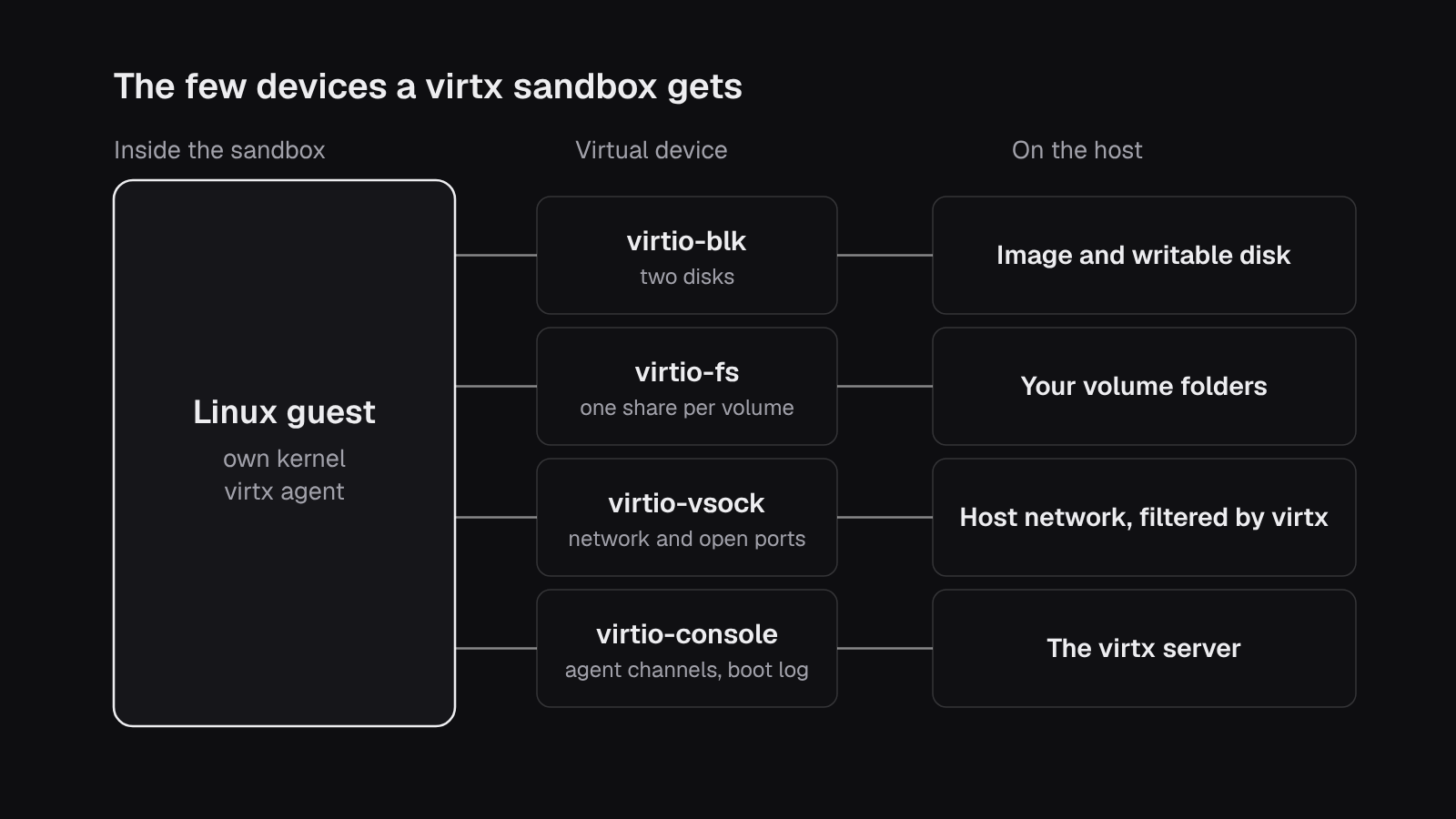
Each device has one job, so the list stays short. Two behaviours follow from this layout:
- Idle sandboxes pause: a sandbox that nothing has used for five minutes has its VM stopped, and it boots again over the same writable disk the next time something uses it.
VIRTX_PARK_AFTER_MSchanges the time, and0turns it off. - No network card to configure: libkrun passes the guest’s socket calls to the host, and virtx limits where they may go. A new sandbox reaches public addresses and not the host’s loopback or private ones.
Starting a disposable microVM from Python with virtx
The example below builds an image with jq in it, boots a sandbox from that image, runs one command and removes the sandbox. Install the client first with pip install virtx.
import asyncio
from virtx import Client, Recipe
async def main() -> None:    with Client.spawn() as client:        recipe = Recipe("alpine:latest").run("apk add --no-cache jq")        await client.build_image(recipe, "jq:latest").complete(print=True)
        sandbox = await client.create_sandbox("jq:latest")        try:            cmd = ["sh", "-c", """echo '{"hello": "virtx"}' | jq -r .hello"""]            code = await sandbox.exec(cmd).complete(print=True)            print("exited", code)        finally:            await sandbox.remove()
asyncio.run(main())
Client.spawn() starts a local virtx server for you. Whatever the sandbox installed is gone once sandbox.remove() runs, unless it wrote the data to a volume you kept.
Images reach a server in three ways: pull any OCI image from Docker Hub or another registry, build one from a recipe in code, or build one from a Dockerfile. virtx reads a Dockerfile as a recipe of one stage with only FROM, RUN, ENV and WORKDIR, and it refuses any other instruction.
To see the separate kernel for yourself, run uname -r through exec in the sandbox and compare it with the same command on your host. On a Mac or a Windows machine the two differ in kind, since the host runs Darwin or Windows and the sandbox runs Linux.
code = await sandbox.exec(["uname", "-r"]).complete(print=True)The next table lists the options you set when you create a sandbox, with the defaults of a local or self-run server.
| Option | Default | What it controls |
|---|---|---|
vcpus |
4 | The sandbox’s CPUs |
memory_mib |
4096 | Its memory, in MiB |
disk_gib |
2 | How much it may write over its image, in GiB |
network |
True |
False blocks outbound connections and name lookups |
ports |
none | TCP ports in the sandbox to reach from outside |
volumes |
none | Volumes mounted at paths in the sandbox |
The host that runs the server needs one of these hypervisors. Guests are always Linux.
| Host | Hypervisor | Requirements |
|---|---|---|
| Linux | KVM | /dev/kvm available to your user, with hardware virtualization enabled in the firmware |
| macOS | Hypervisor.framework | Apple silicon only; the framework is built in |
| Windows | Windows Hypervisor Platform | Windows 11 or later, x86_64 only |
The same code also runs against a server you host yourself: Client.connect(url, auth=BearerAuth(token)) takes the place of Client.spawn(). virtx cloud is in early access.
Situations where a disposable microVM helps or gets in the way
A microVM fits some jobs and gets in the way of others. Reach for one in these cases:
- Untrusted code: a customer’s script, a package install script or code an AI agent just wrote.
- Heavy dependencies: a job whose tools you would rather not install on your own machine.
- Clean machine every run: work where leftovers from the last run would skew the result.
Look at another tool in these cases:
- Trusted code on a host you control: a container starts faster and costs less memory.
- A missing device: a workload that needs hardware the monitor leaves out.
- No hardware virtualization: a host that cannot offer it to your user.
Deciding whether a disposable microVM fits your job
A microVM is a virtual machine on a diet. It keeps the kernel of its own and the hypervisor underneath, and it drops the firmware and most of the emulated hardware that made virtual machines slow to start. Reach for one when the code is untrusted, the job has heavy dependencies you would rather not install on your machine, or you want a clean machine every run.
To try it, follow the quickstart in the virtx repository.
FAQs
What is a microVM in simple terms?
A microVM is a small virtual machine. It has its own kernel and a hypervisor-enforced boundary like any virtual machine, and it emulates the devices a workload needs and little else, so it starts fast and uses little memory.
Is a microVM a container or a virtual machine?
A microVM is a virtual machine. A container shares the host’s kernel, while a microVM brings its own, which is why the two give different isolation.
How is a microVM different from a full virtual machine?
A full virtual machine boots through firmware and emulates a broad set of hardware. A microVM removes the firmware stage and most of that hardware, which shortens startup and trims memory use.
Do I need special hardware to run a microVM?
You need a processor with hardware virtualization support, turned on in the machine’s firmware where the host requires it.
Can I run a microVM on a Mac or a Windows laptop?
With virtx, yes on a Mac with Apple silicon and on Windows 11 with an x86_64 processor. Both run Linux guests.